 DblSpace
Double-tap Space for a period.
The handy shortcut from Mac and iPhone, now on Windows. Tap Space twice at the end of a sentence and DblSpace types ". " for you.
Free and open source · Windows 10 & 11 (64-bit)
Small app, done right
DblSpace sits quietly in the system tray and only steps in when you double-tap Space after a word.
Works everywhere
Word, Outlook, browsers, chat apps. Any app and any keyboard layout, including accented and non-Latin ones.
Stays out of the way
Never in password fields. Skips code editors, terminals and fullscreen games by default, and leaves Chinese, Japanese and Korean input alone.
Your speed
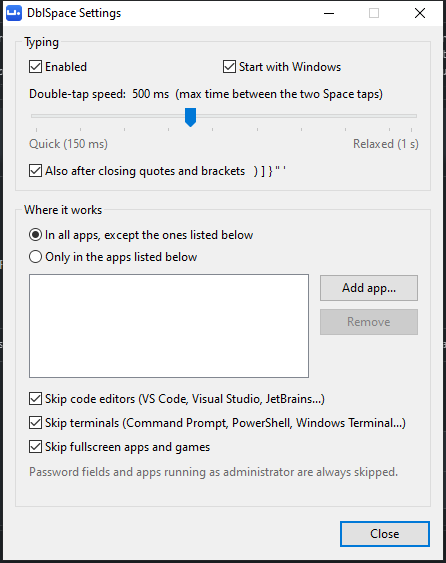
Set how fast the two taps must be, from 150 ms to a relaxed full second.
Per-app control
Turn it off in specific apps, or turn it on only in the apps you choose.
Lightweight
A single 120 KB program with nothing extra to install. It uses almost no memory or CPU.
Private
It never records what you type and has no network code. It can't send anything anywhere.
Get started
- Download the installer (
DblSpace-Setup-…exe) and run it. It installs for your account only, so no admin rights are needed. - Look for the blue icon in the system tray, near the clock. Blue means on and gray means off.
- Click the icon and choose Settings to adjust the speed or choose where it works.
Your keystrokes and privacy
To notice a double-tap, DblSpace has to see each key you press. Here is exactly what it does with them:
- It doesn't record what you type. For each key it keeps only a category (letter or digit, space, closing bracket or quote, or something else) for the last few keys. That's enough to tell whether a double space follows a word.
- It saves nothing about your typing. Only your settings are saved, in the Windows registry under
HKEY_CURRENT_USER\Software\DblSpace. - It sends nothing anywhere. DblSpace has no network code at all.
This program will not transfer any information to other networked systems unless specifically requested by the user or the person installing or operating it.
The full source code is on GitHub, so you can check all of this yourself.
Code signing policy
Releases are not code-signed yet. Free signing from the SignPath Foundation has been requested.
Every release is built from this repository by GitHub Actions, not on anyone's PC.
Team roles:
- Committers and reviewers: Christopher Martinez
- Approvers: Christopher Martinez
Privacy: see Your keystrokes and privacy.